How to Set Up a Google Business Profile Properly
Google's own rules for setting up a Business Profile: eligibility, your name, hidden addresses for service-area businesses, staffed hours, categories and verification.
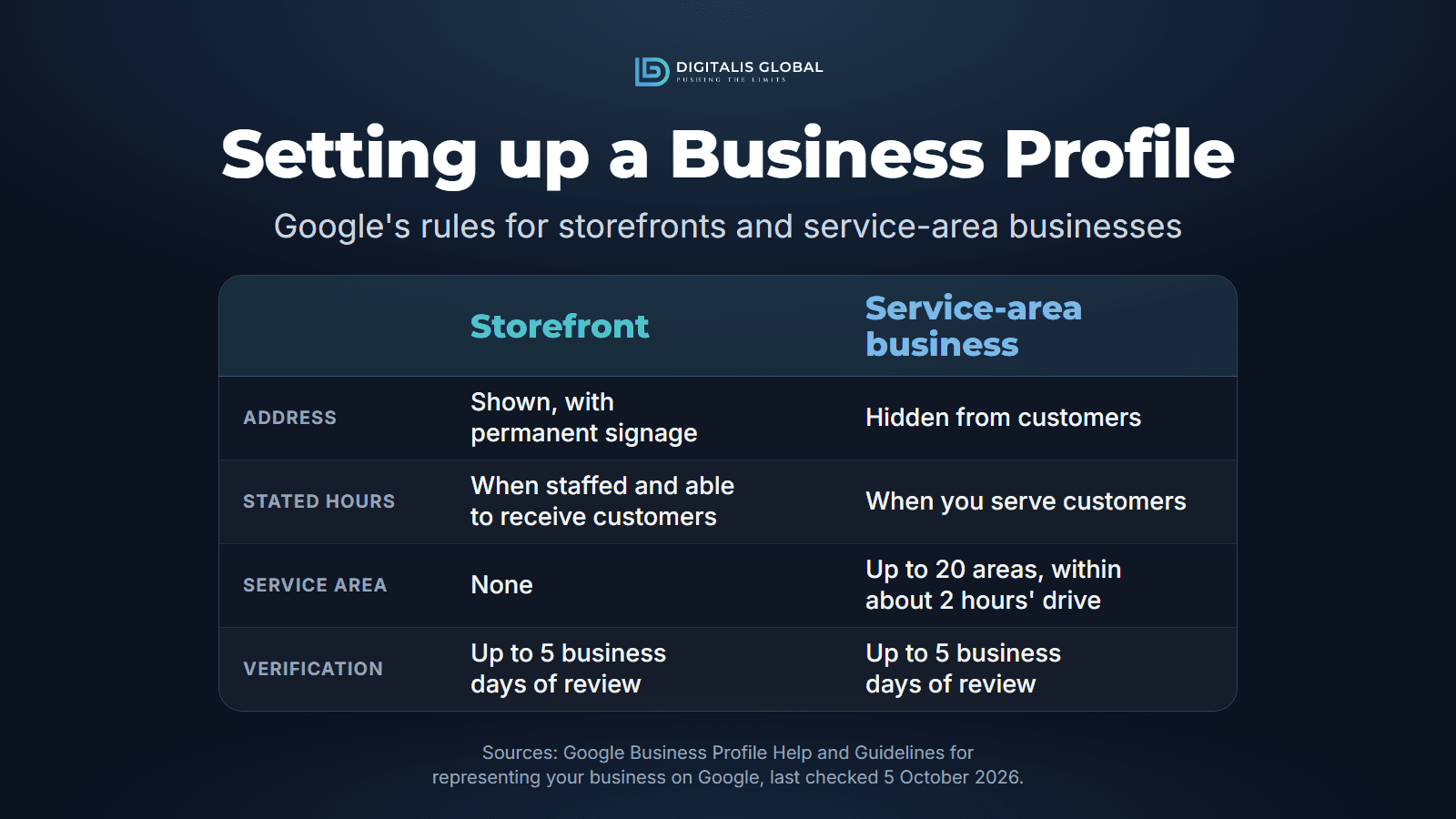
To set up a Google Business Profile properly, sign in with a Google Account your business controls, enter your business's real-world name, choose the fewest and most specific categories, and tell Google honestly whether customers come to you. A storefront shows its address; a service-area business hides it and lists the areas it serves. Then set the hours you actually serve customers and verify the profile, which Google says takes up to 5 business days of review once you complete the steps. Each rule below comes from Google's Guidelines for representing your business on Google or its Business Profile Help pages, all last checked 9 November 2026, and Google warns that breaking them can get a profile suspended.
Check that your business is eligible
Google's test is short: "To qualify for a Business Profile, a business must make in-person contact with customers during its stated hours" (Business eligibility and ownership guidelines). That covers a shop customers visit and a tradesperson who visits customers. It rules out a business that never meets its customers.
| Eligible | Not eligible |
|---|---|
| A location customers can visit, staffed during its stated hours | Online-only businesses, brands, organisations and artists |
| A business that travels to customers, such as a plumber or a cleaner | Lead generation agents or companies |
| A business that does both (a hybrid business) | A virtual office (a mailing address you don't operate from), a P.O. box or a remote mailbox |
| A seasonal business with permanent signage year-round | A co-working desk without clear signage, staff during business hours and customers received there |
| A sales or leasing office (even though the properties it rents or sells are not) | Rental or for-sale properties, and an ongoing class or meeting at a place you don't own or represent |
Sources: Business eligibility and ownership guidelines, and the address section of the Guidelines. For an online-only business, Google points to Google Ads instead (Get started with Google Business Profile); our guide to Google Ads costs in Australia covers that route.
Storefront, service-area or hybrid: decide first
This choice decides whether your address is shown, whether you list a service area, and what your hours mean. Google's sign-up form asks whether you have a location customers can visit, and says to answer Yes only "for businesses with a storefront staffed during business hours" (Sign up for Business Profile).
| Type | Storefront | Service-area business | Hybrid |
|---|---|---|---|
| What it is | Serves customers in person at a location with permanent on-site signage | Visits or delivers to customers, but doesn't serve them at its address | Serves customers at its address and also visits or delivers to them |
| Address | Shown | Hidden | Shown |
| Service area | None | Up to 20 areas | Up to 20 areas |
| Hours | When the location is staffed and can receive customers | When you serve customers | When your staff are available at the location |
Sources: Manage your service areas, Verify your business with a video recording and the Guidelines. Google adds that a business without permanent on-site signage is not eligible as a storefront and should be listed as a service-area business.
Set up the profile, step by step
These steps follow Google's own sign-up form. Google says you can add or claim your business at no charge (Add or claim your Business Profile).
-

Step 1 · Account
Sign in with an account your business controls
- Business email
- One account per person
Google suggests signing up with your business email domain if you create a new Google Account. Use one the business will keep, not a staff member's or your agency's; anyone who helps later gets their own access, so nobody shares a password (Manage owners and managers).
-

Step 2 · Name and category
Enter your real name, then your main category
- No keywords in the name
- Pick from Google's list
Type the name on your signage, website and invoices. If your business appears in the suggestions and someone else has already verified it, request ownership instead of creating a second profile.
-

Step 3 · Location
Address or service area
- Storefront: Yes
- Service-area: No
Answer Yes to "a location customers can visit" only for a storefront staffed during business hours, then enter the address or place a pin. Otherwise answer No and enter your service areas.
-

Step 4 · Contact
Add a phone number and website
- Local number
- No call centre
Use a number under the business's direct control, ideally a local one rather than a central call centre, and your own website. Google does not accept premium numbers, or numbers and links that redirect to someone else.
-

Step 5 · Verify
Review your details, then verify
- Up to 5 business days
Google recommends reviewing your information before you request verification, and customers can find your profile only once verification is complete.
Your business name: what Google allows
Google says your name should reflect your business's real-world name, as used consistently on your storefront, website and stationery, and that adding unnecessary information to it "could result in the suspension of your Business Profile" (Guidelines). Your suburb, services and hours belong in their own fields. The examples are Google's own:
| Not allowed in the name | Not acceptable | Acceptable |
|---|---|---|
| Marketing taglines | GNC Live Well | GNC |
| Service or product information | Midas Auto Service Experts | Midas |
| Location information | Equinox near SOHO | Equinox SOHO |
| Business hours | Regal Pizzeria Open 24 hours | Regal Pizzeria |
| Irrelevant legal terms | LAZ Parking Ltd | LAZ Parking |
| Containment information | Geek Squad (inside Best Buy) | Geek Squad |
Google's list also rules out store codes, trademark signs, fully capitalised words, phone numbers and website addresses. Legal terms and special characters are allowed only with real-world proof, such as signage, business cards or invoices, that consistently shows them as part of the name. We read that as covering "Pty Ltd": leave it out unless your signage carries it.
Service-area businesses: hide the address, set the area
If customers do not come to you, Google is direct: "If you're a service-area business, you should hide your business address from customers." Its example is a plumber who runs the business from home and should clear the address from the profile (Guidelines). The profile then shows your service area instead.
- To hide the address: select Edit profile, then Location; next to "Business location" select Edit, turn off "Show business address to customers" and save. Google says to do this only if you are a service-area business, and that if you enter no service area, a local area is chosen for you (Manage your business address).
- Set up to 20 service areas by city, postcode or other area. You can't use a radius, and the boundaries of your overall area shouldn't be more than about 2 hours of driving time from where your business is based. Approved edits can take up to 48 hours to show (Manage your service areas).
- One profile for the area you serve, unless a different location has its own service area and its own staff. Google says your account may be suspended if it finds multiple profiles for the same business in the same metropolitan area (Guidelines and Sign up for Business Profile).
- No virtual office: service-area businesses can't list a "virtual" office unless it is staffed during business hours (Guidelines).
- Age-restricted products need a storefront: businesses selling alcohol, cannabis or weapons can't be service-area businesses without one (Business eligibility and ownership guidelines).
Google still confirms where you are based, even though customers will not see it. To verify by video from home, Google says you can film landmarks and signs in your immediate neighbourhood, then your tools, equipment or branded van, and a business document such as an invoice or utility bill in the business name (Verify your business with a video recording).
Hours: list the hours you are really there
Hours are easy to get wrong. Google asks you to "provide your regular customer-facing hours of operation" (Guidelines), and its eligibility rule ties a profile to "in-person contact with customers during its stated hours" (Business eligibility and ownership guidelines). A business that shows its address should be "staffed by your team and able to receive customers during its stated hours" (Guidelines), and hybrid businesses set their hours "for when their staff is available" (Manage your service areas).
Read together, those rules mean stated hours are staffed hours. "Open 24 hours" is true only if someone really is there for customers around the clock, and a service-area business should list the hours it actually serves customers. Google's other hours rules:
- By appointment only: Google says businesses that operate only by appointment shouldn't provide hours; the editor has an "Open with no main hours" option (Guidelines, and Edit your business hours).
- Holidays and short closures: use special hours for up to 6 days in a row, and confirm your hours for official holidays even when they are unchanged (How to set Special hours).
- Longer closures: closed for 7 or more days in a row, or for an unknown period, means marking the business temporarily closed (How to set Special hours).
Categories: fewer and more specific
Your primary category tells Google what your business is, and Google says "the categories you select affect your local ranking on Google" (Manage your business category). The rules:
- Choose from Google's list; you can't create your own. If the specific category is missing, choose a more general one.
- Pick categories that complete "This business IS a", not "this business HAS a". Google's example: a motel with a pool is a Motel, not a Swimming Pool (Guidelines).
- Use as few as possible. You can add up to 9 after the primary one (Edit your Business Profile), but that is a limit, not a target.
- Do not use categories as keywords, or for a business located inside yours. Changing a category later may mean verifying again.
Verification: what to expect
Google chooses the verification methods for you, based on your business type, public information, region and business hours, and you can't change them; some businesses need more than one. Google recommends video verification where it is offered (Verify your business on Google).
| Method | What to know |
|---|---|
| Phone, text or email | You must be able to answer the business number, receive texts or use the email address shown. An automated phone menu won't get the code. |
| Video recording | At least 30 seconds, filmed live in one unedited take on a mobile device through your profile, showing your location, proof the business exists and proof you manage it. No other people's faces and no sensitive numbers. |
| Live video call | Only within your location's business hours, and only where offered. |
| Postcard | Most codes arrive within 14 days and expire after 30. While you wait, do not edit your name, address or category, and do not request a new code. |
After you complete the steps, Google reviews the information, which it says takes up to 5 business days and on rare occasions longer; sometimes it verifies instantly, for example when you have verified your website in Search Console. Treat the code like a password: Google will never ask you for it, and you should not share it, even with people who manage your profile (Verify your business on Google and Verify your business with a video recording).
After verification: finish and keep it accurate
- Business description: up to 750 characters on what you offer, what makes you different and how long you have traded, with no links and no promotions or prices (Edit your Business Profile and the Guidelines).
- More phone numbers: up to 2 besides the main one, mobile or landline but not fax (Edit your Business Profile).
- Owners and managers: a profile has one primary owner. Add your agency or staff as managers, who can edit the profile and reply to reviews but can't add or remove users or remove the profile (Manage owners and managers).
- Reviews: ask every customer, in the same words, once the work is done. Our guide on how to ask for Google reviews sets out Google's rules, including what it bans.
- Keep signing in: Google may revoke access for owners who don't access their profile for long periods, after adequate warning (Overview of Google Business Profile policies).
Google says most profile changes show in about 10 minutes but can take up to 30 days (Manage your business address).
Setup mistakes that can get a profile suspended or restricted
- Suburbs, services or keywords added to the business name.
- A P.O. box, or a virtual office nobody works from, used as the address.
- More than one profile for the same business in the same area.
- A business with no in-person contact with customers, such as an online-only store.
- A pattern of breaking the policies, which Google says can restrict the whole account and suspend every profile on it.
Sources: the Guidelines, Overview of Google Business Profile policies, and Business eligibility and ownership guidelines.
How Google ranks local results
Google says local results are mainly based on relevance (how well a profile matches the search), distance (how far the business is from the searcher) and popularity. Its section on prominence describes how well-known a business is, based partly on how many websites link to your business and how many reviews you have. It also says "there's no way to request or pay for a better local ranking" (Tips to improve your local ranking on Google). A complete, accurate, verified profile is the part you control. The rest is your website and your reputation; our guide to what SEO costs in Australia explains what that work involves.
Common questions about Google Business Profile
Does a Google Business Profile cost anything?
No. Google says you can add or claim your business at no charge and manage how it shows on Maps and Search at no charge (Add or claim your Business Profile and Get started with Google Business Profile).
Can I run my profile from my home address?
Yes, as a service-area business with the address hidden: Google's own example is a plumber working from home, who should clear the address and list a service area instead (Guidelines).
How long does verification take?
Up to 5 business days of review after you complete the steps, occasionally longer; a postcard adds the posting time, and Google says most codes arrive within 14 days (Verify your business on Google).
Should I put my suburb or services in my business name?
No. Google does not allow location, service or product information in the name unless it is part of your real-world name, and says unnecessary information could get the profile suspended (Guidelines).
Can my agency own my Business Profile?
It should not: Google tells third parties never to claim a profile without the owner's express consent, to encourage the owner to own it and add them as managers, and to transfer ownership immediately on request (Business eligibility and ownership guidelines).
Getting help with your profile
Our technical SEO and local search service includes Google Business Profile setup and optimisation where local search is in scope. We quote after a free scoping call, as a written proposal with the scope, a fixed price and the exclusions; how we scope and quote explains the process, and our Sydney page covers how we work with Sydney businesses.
Sources
Every source below was read on 5 October 2026 and re-read on 9 November 2026. Google changes its Business Profile pages and forms without notice, so check the linked page before you rely on a rule. All are Google Business Profile Help pages:
- Guidelines for representing your business on Google (name, address, service-area businesses, phone and website, hours, categories)
- Business eligibility and ownership guidelines and Overview of Google Business Profile policies
- Get started with Google Business Profile, Sign up for Business Profile and Add or claim your Business Profile
- Manage your service areas for service-area and hybrid businesses and Manage your business address
- Edit your business hours and How to set Special hours
- Manage your business category and Edit your Business Profile (categories, phone numbers, description)
- Verify your business on Google and Verify your business with a video recording
- Manage your Business Profile owners and managers and Tips to improve your local ranking on Google
Drafted with AI assistance; researched and reviewed by Saad Ali.
Founder / CEO